> ## Documentation Index
> Fetch the complete documentation index at: https://wb-21fd5541-docs-weave-byob-note.mintlify.site/llms.txt
> Use this file to discover all available pages before exploring further.
# W&B Server의 자동 업데이트 비활성화
> W&B Server의 자동 업데이트를 비활성화하는 방법을 알아보세요.
이 페이지에서는 Self-Managed W\&B 배포의 관리자가 W\&B Server의 자동 버전 업그레이드를 비활성화하고 특정 릴리스로 버전을 고정하는 방법을 설명합니다. 버전을 고정하면 업그레이드 시점을 제어할 수 있습니다. 이러한 제어는 내부 변경 관리 프로세스에 맞춰 업그레이드를 조율하거나, 릴리스를 실제로 배포하기 전에 스테이징 환경에서 검증해야 할 때 유용합니다. 이 지침은 [W\&B Kubernetes Operator](/ko/platform/hosting/self-managed/operator)로 관리되는 배포에만 적용됩니다.
W\&B는 W\&B Server의 메이저 릴리스를 최초 릴리스일로부터 12개월 동안 지원합니다. **Self-Managed** 인스턴스를 사용하는 고객은 지원 상태를 유지할 수 있도록 제때 업그레이드할 책임이 있습니다. 지원되지 않는 버전을 계속 사용하지 마세요. W\&B는 **Self-Managed** 인스턴스를 사용하는 고객이 지원 상태를 유지하고 최신 특성, 성능 개선, 수정 사항을 받기 위해 최소한 분기마다 한 번은 배포를 최신 릴리스로 업데이트할 것을 권장합니다.
## 요구 사항
* W\&B Kubernetes Operator `v1.13.0` 이상
* System Console `v2.12.2` 이상
이 요구 사항을 충족하는지 확인하려면 해당 인스턴스의 W\&B Custom Resource 또는 Helm chart를 참고하세요. `operator-wandb` 및 `system-console` 컴포넌트의 `version` 값을 확인하세요.
## 자동 업데이트 비활성화
자동 업데이트를 비활성화하려면 System Console에서 W\&B Server를 특정 버전에 고정한 다음, Operator reconciliation 로그를 확인하여 버전 고정이 활성화되었는지 확인합니다.
1. `admin` 역할이 있는 사용자로 W\&B App에 로그인합니다.
2. 상단의 사용자 아이콘을 클릭한 다음 **System Console**을 클릭합니다.
3. **Settings** > **Advanced**로 이동한 다음 **Other** 탭을 선택합니다.
4. **Disable Auto Upgrades** 섹션에서 **Pin specific version**을 켭니다.
5. **Select a version** 드롭다운 목록을 클릭한 다음 W\&B Server 버전을 선택합니다.
6. **Save**를 클릭합니다.
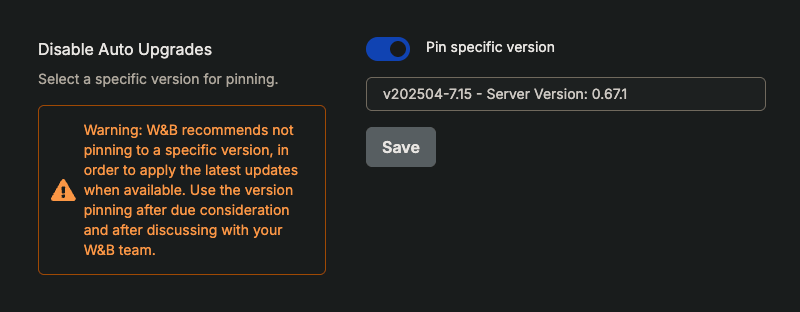 자동 업그레이드가 비활성화되고 W\&B Server는 선택한 버전에 고정됩니다.
7. 자동 업그레이드가 비활성화되었는지 확인합니다. **Operator** 탭으로 이동한 다음 reconciliation 로그에서 `Version pinning is enabled` 문자열을 검색합니다.
```text theme={null}
│info 2025-04-17T17:24:16Z wandb default No changes found
│info 2025-04-17T17:24:16Z wandb default Active spec found
│info 2025-04-17T17:24:16Z wandb default Desired spec
│info 2025-04-17T17:24:16Z wandb default License
│info 2025-04-17T17:24:16Z wandb default Version Pinning is enabled
│info 2025-04-17T17:24:16Z wandb default Found Weights & Biases instance, processing the spec...
│info 2025-04-17T17:24:16Z wandb default === Reconciling Weights & Biases instance...
```
자동 업그레이드가 비활성화되고 W\&B Server는 선택한 버전에 고정됩니다.
7. 자동 업그레이드가 비활성화되었는지 확인합니다. **Operator** 탭으로 이동한 다음 reconciliation 로그에서 `Version pinning is enabled` 문자열을 검색합니다.
```text theme={null}
│info 2025-04-17T17:24:16Z wandb default No changes found
│info 2025-04-17T17:24:16Z wandb default Active spec found
│info 2025-04-17T17:24:16Z wandb default Desired spec
│info 2025-04-17T17:24:16Z wandb default License
│info 2025-04-17T17:24:16Z wandb default Version Pinning is enabled
│info 2025-04-17T17:24:16Z wandb default Found Weights & Biases instance, processing the spec...
│info 2025-04-17T17:24:16Z wandb default === Reconciling Weights & Biases instance...
```